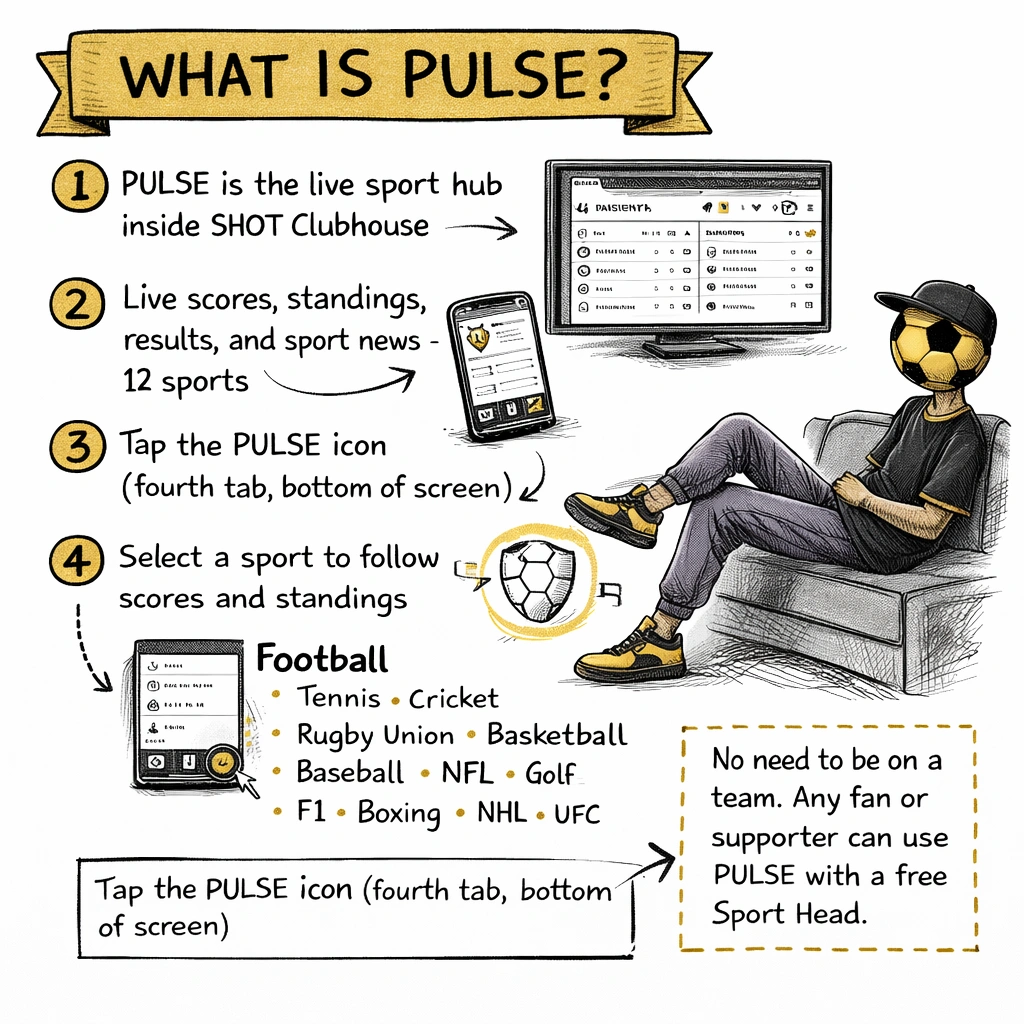
Live scores, standings, match results, and sport news — for 12 sports, inside the SHOT Clubhouse app. Whether you follow football, tennis, cricket, rugby, or boxing, PULSE brings live data and content into the same place as your club and your development.
PULSE is one of the four rooms in SHOT Clubhouse, accessible from the bottom navigation of the app. It is the live sport layer — separate from your team, your evaluations, and the Locker shop.
Inside PULSE you will find the Sport Hub, which pulls in live scores, standings, and results for major competitions across 12 sports, alongside sport news, articles, and content for the clubs and athletes you follow.
The four rooms: SHOT Clubhouse is organised into Clubhouse (your team), Locker (club shop), Perform (evaluations and development), and Pulse (live scores and sport content). PULSE is the fourth icon at the bottom of the screen.
The Sport Hub
The Sport Hub is the live data engine inside PULSE. It aggregates scores, standings, and results from competitions around the world and surfaces them in a clean, sport-specific view inside the app.
What you see in the Sport Hub
1
Live scores
Scores updated in real time during matches, including in-play updates for supported competitions.
2
Standings and tables
League tables, division standings, and tournament brackets — kept current throughout the season.
3
Results and fixtures
Recent results and upcoming fixtures for the competitions and clubs you follow within each sport.
4
Sport news and content
Articles, highlights, and news relevant to your sport, curated and delivered inside PULSE alongside the live data.
How to access it
A
Tap the PULSE icon
The fourth icon at the bottom of the screen. PULSE opens on your personalised sport feed.
B
Select your sport
Tap the sport you want to follow from the Sport Hub. Each sport has its own live data view with scores, standings, and results specific to that sport's competitions.
C
Follow clubs and competitions
Within each sport, you can follow specific clubs, teams, or competitions to pin their data to the top of your PULSE feed.
Sports covered
The Sport Hub currently covers 12 sports with live scores and standings. More are on the way.
⚽
Football
Scores · Tables · Fixtures
🎾
Tennis
Scores · Rankings · Results
🏏
Cricket
Scores · Standings · Results
🏉
Rugby Union
Scores · Tables · Fixtures
🏀
Basketball
Scores · Standings · Results
⚾
Baseball (MLB)
Scores · Standings · Results
🏈
American Football (NFL)
Scores · Standings · Results
⛳
Golf
Leaderboards · Results
🏎️
Motorsport (F1)
Race results · Standings
🥊
Boxing
Results · Rankings
🏒
Ice Hockey (NHL)
Scores · Standings · Results
🥋
UFC / MMA
Results · Rankings
🏐
Netball
Coming soon
PERFORM frameworks vs PULSE Sport Hub: These are two separate systems. PULSE covers 12 sports with live data. SHOT PERFORM frameworks cover 47 sports for athlete development and evaluation — including handball, badminton, gymnastics, swimming, rowing, dance, and many more. A sport does not need to be in the Sport Hub to have a PERFORM framework, and vice versa.
For fans and supporters
Fan
You do not need to be part of a team or club to use PULSE. If you follow sport — any of the 12 sports in the Sport Hub — PULSE gives you live data and content in the same app your club uses.
Getting started as a fan
1
Create your Sport Head
Download SHOT Clubhouse, sign up, and set your handle and avatar. Choose the sport you follow — this sets your default view in PULSE.
2
Open PULSE and go to the Sport Hub
Tap PULSE at the bottom of the screen. Select your sport and browse live scores, standings, and results.
3
Follow clubs and competitions
Pin the teams and competitions you care about. Their scores and results appear at the top of your feed whenever something is happening.
Your Sport Head travels with you. If your role changes — coaching a team, joining a club, managing a programme — your SHOT identity is already set up. You do not need a new account.
For athletes and coaches
AthleteCoach
PULSE sits alongside your team activity and development in SHOT Clubhouse. As an athlete or coach, your PERFORM tab handles evaluations and events — PULSE is where you follow the wider sport.
How it connects to your sport
When you create your club or team, you choose a sport. PULSE uses that setting to surface the most relevant content and live data for your sport automatically. A football coach sees football in PULSE. A tennis coach sees tennis. You can always browse other sports from the Sport Hub menu.
What athletes use PULSE for
✓
Follow their sport at the top level
Live scores and standings for the professional or elite competitions in their sport — in the same app they use to complete their weekly evaluations.
✓
Read sport news and articles
Content relevant to their sport — technique, nutrition, athlete stories, and development pieces — all within PULSE.
What coaches use PULSE for
✓
Stay current in the sport
Keep up with what is happening at the top level, which can inform session planning, discussions with athletes, and the context you bring to coaching.
✓
Share content with the squad
Relevant articles and content from PULSE can be shared with athletes as part of the club's broader development conversations.
Coming soon
More sports in the Sport Hub. Netball is next, followed by additional sports as the platform grows. If the sport you follow is not yet in the live data hub, you can still get sport news and content for it within PULSE.
Public club pages and fan profiles. Follow clubs and athletes from outside the team. PULSE expands into a broader sport community feed — so fans, families, and supporters can stay connected to the clubs they care about without needing to be part of the team.
Want a sport added sooner? Tell us which one — we prioritise based on what the community asks for.